> ## Documentation Index
> Fetch the complete documentation index at: https://botpress-pb-update-api.mintlify.site/llms.txt
> Use this file to discover all available pages before exploring further.
# Tables
> Define and query structured data storage.
Tables provide typed, structured storage for your agent. You define a schema using `z` from `@botpress/runtime`, and the ADK syncs it with Botpress on deploy. Tables are accessible from conversations, workflows, actions, tools, and triggers.
## Creating a table
Create a file in `src/tables/`:
```typescript theme={null}
import { Table, z } from "@botpress/runtime"
export default new Table({
name: "OrderTable",
description: "Customer orders",
keyColumn: "userId",
columns: {
userId: z.string(),
items: z.array(z.string()),
total: z.number(),
status: z.string(),
},
})
```
The `description` field is optional but useful when the table gets surfaced to the LLM (via Zai or knowledge). `keyColumn` is optional too; it sets the default key used when calling [`.upsertRows()`](#upsert-rows) so you don't have to pass it on every call.
 ### Naming rules
Table names:
* Must start with a letter, underscore, or `$`
* Must be 35 characters or less
* Must contain only letters, numbers, and underscores
* Must end with `Table`
* Cannot be a UUID
### Searchable columns
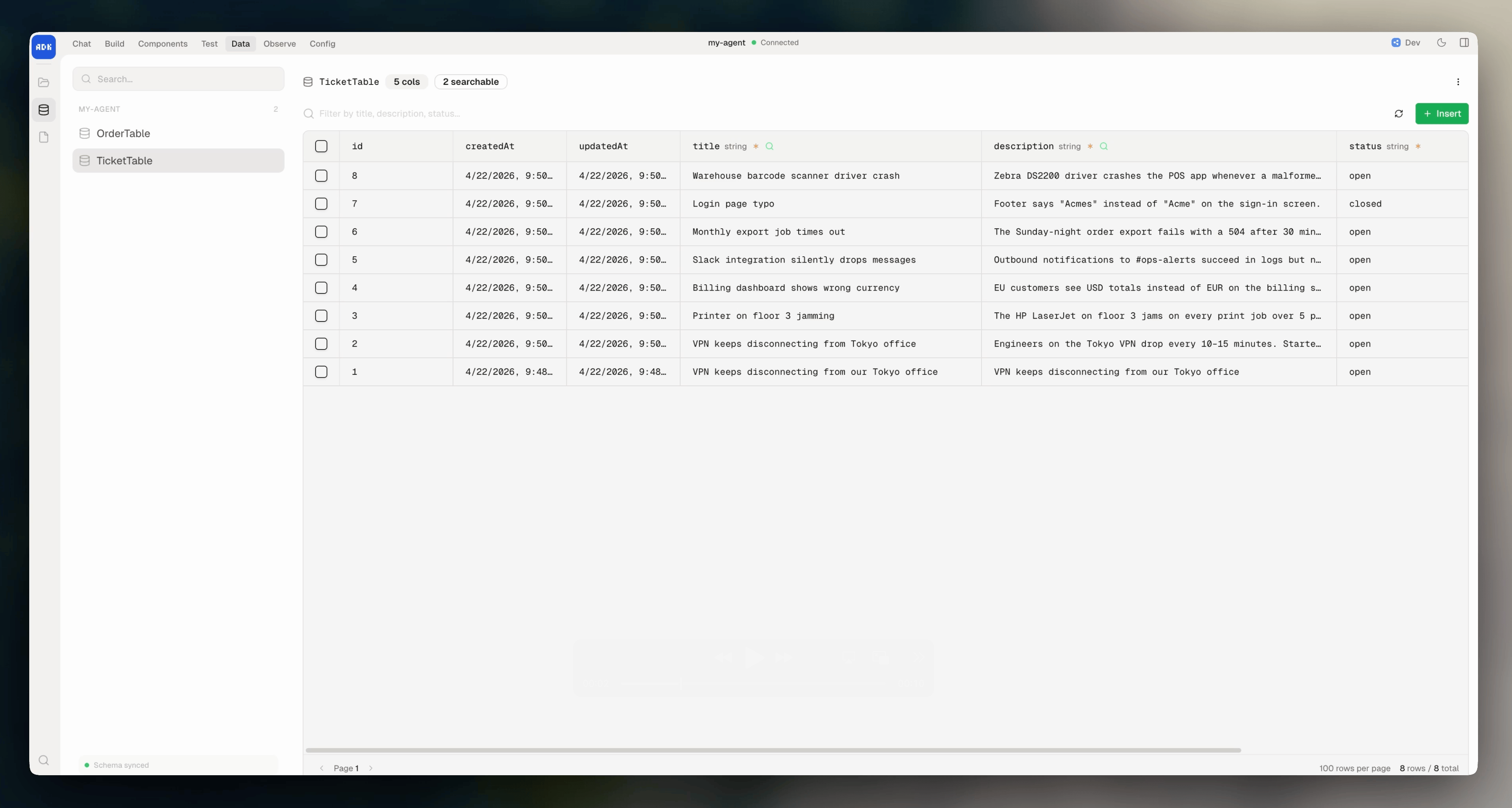
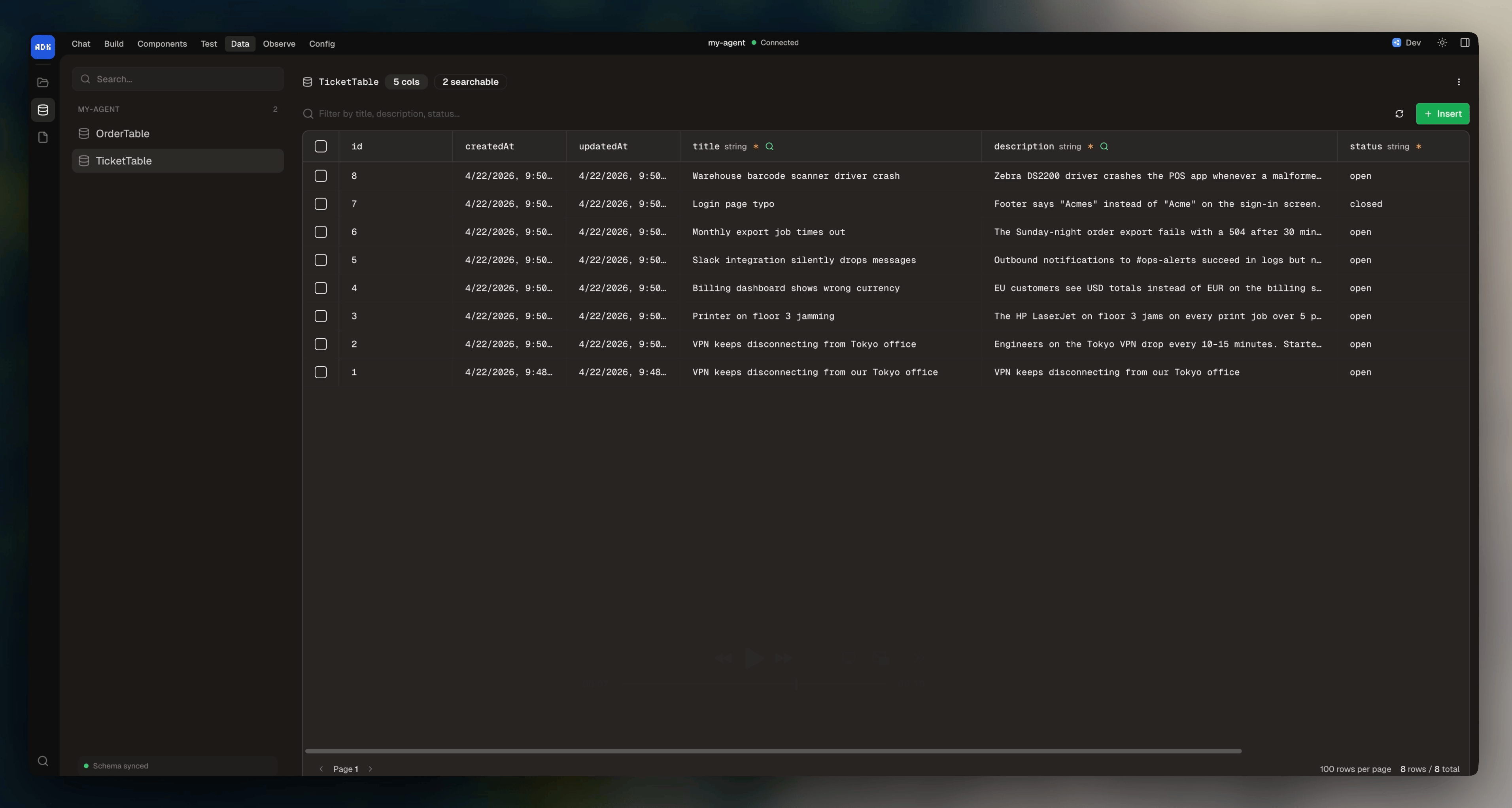
You can mark columns as searchable to enable semantic search:
```typescript theme={null}
export default new Table({
name: "TicketTable",
columns: {
title: { schema: z.string(), searchable: true },
description: { schema: z.string(), searchable: true },
status: z.string(),
priority: z.string(),
},
})
```
### Computed columns
A computed column is derived from other columns. Set `computed: true`, pass the columns it depends on into `dependencies`, and return its value from `value`:
```typescript highlight={7,9-10} theme={null}
export default new Table({
name: "OrderTable",
columns: {
quantity: z.number(),
unitPrice: z.number(),
total: {
computed: true,
schema: z.number(),
dependencies: ["quantity", "unitPrice"],
value: (row) => row.quantity * row.unitPrice,
},
},
})
```
Computed columns recalculate whenever their dependencies change. When you write to the table, you can pass `waitComputed: true` to block any further modifications to the table until the recalculation finishes:
```typescript theme={null}
await OrderTable.createRows({
rows: [{ quantity: 3, unitPrice: 20 }],
waitComputed: true,
})
```
## Managing table data
You can manage your table data in the dev console under **Data > Tables**. Here, you can:
* View the sync state between your code and Botpress' servers
* Add/update/delete rows
* Filter and sort
* Export to CSV
* Copy data between development and production environments
## CRUD operations
To perform operations on your table within your agent's code, import the table and use the typed instance methods.
### Create rows
```typescript theme={null}
import OrderTable from "../tables/order-table"
const { rows } = await OrderTable.createRows({
rows: [{ userId: "user123", total: 99.99, status: "pending" }],
})
```
### Find rows
```typescript theme={null}
const { rows } = await OrderTable.findRows({
filter: { status: "pending" },
orderBy: "createdAt",
orderDirection: "desc",
limit: 10,
})
```
### Get a single row
```typescript theme={null}
const row = await OrderTable.getRow({ id: 42 })
```
### Update rows
```typescript theme={null}
await OrderTable.updateRows({
rows: [{ id: orders[0].id, status: "completed" }],
})
```
### Upsert rows
Insert or update based on a key column:
```typescript theme={null}
const { inserted, updated } = await OrderTable.upsertRows({
keyColumn: "userId",
rows: [{ userId: "user123", total: 149.99, status: "pending" }],
})
```
If you [set `keyColumn` on the table](#creating-a-table), you can omit it here.
If `keyColumn` is omitted on both the table defintion and the `upsertRows` call, it defaults to `id`.
### Delete rows
```typescript Delete rows by name theme={null}
await OrderTable.deleteRows({ status: "cancelled" })
```
```typescript Delete rows by ID theme={null}
await OrderTable.deleteRowIds([1, 2, 3])
```
```typescript Delete all rows theme={null}
await OrderTable.deleteAllRows()
```
## Filtering
When calling `findRows()`, you can pass in filters for specific rows. These can use [MongoDB-style operators](https://www.mongodb.com/docs/manual/reference/mql/query-predicates/) for advanced queries:
```typescript theme={null}
const { rows } = await OrderTable.findRows({
filter: {
total: { $gt: 100 },
status: { $in: ["pending", "processing"] },
},
})
```
### Operators
| Operator | Description |
| ---------- | ----------------------------------------------------------------- |
| `$eq` | Equal to |
| `$ne` | Not equal to |
| `$gt` | Greater than |
| `$gte` | Greater than or equal |
| `$lt` | Less than |
| `$lte` | Less than or equal |
| `$in` | In array |
| `$nin` | Not in array |
| `$exists` | Field exists |
| `$regex` | Regex match |
| `$options` | Regex flags: `"i"` for case-insensitive, `"c"` for case-sensitive |
### Logical operators
You can combine filters with `$and`, `$or`, and `$not`:
```typescript theme={null}
const { rows } = await OrderTable.findRows({
filter: {
$or: [
{ status: "pending" },
{ total: { $gt: 500 } },
],
},
})
```
## Semantic search
You can search across [`searchable` columns](#searchable-columns) using natural language:
```typescript theme={null}
const { rows } = await TicketTable.findRows({
search: "VPN connection issues",
limit: 10,
})
```
Combine with filters for hybrid queries:
```typescript theme={null}
const { rows } = await TicketTable.findRows({
search: "network problems",
filter: { status: "open" },
limit: 20,
})
```
## Aggregation
Aggregation groups rows by one or more columns and computes summary statistics for other columns. This transforms your table data into summary reports.
Pass a `group` object to `findRows()` where each key is a column name and the value is either a single operation or an array of operations:
```typescript theme={null}
const { rows } = await OrderTable.findRows({
group: {
status: "key", // Group by status
total: ["sum", "avg"], // Sum and average the total column
id: "count", // Count rows in each group
},
})
```
The returned rows have different fields based on your group configuration. The field names combine the column name (in `camelCase`) with the operation:
```typescript theme={null}
// For the group config above, each row in the result contains:
{
statusKey: "pending", // The grouping value
totalSum: 1500.00, // Sum of totals in this group
totalAvg: 125.00, // Average of totals in this group
idCount: 12, // Number of rows in this group
}
```
Operations vary by column type:
| Operation | Available for | Returns | Description |
| --------- | ----------------------- | -------------- | --------------------------- |
| `key` | All types | Same as column | Groups rows by this value |
| `count` | All types | `number` | Number of rows in the group |
| `sum` | Numbers | `number` | Sum of values |
| `avg` | Numbers | `number` | Average of values |
| `max` | Numbers, strings, dates | Same as column | Maximum value |
| `min` | Numbers, strings, dates | Same as column | Minimum value |
| `unique` | All types | Array | Array of unique values |
### Naming rules
Table names:
* Must start with a letter, underscore, or `$`
* Must be 35 characters or less
* Must contain only letters, numbers, and underscores
* Must end with `Table`
* Cannot be a UUID
### Searchable columns
You can mark columns as searchable to enable semantic search:
```typescript theme={null}
export default new Table({
name: "TicketTable",
columns: {
title: { schema: z.string(), searchable: true },
description: { schema: z.string(), searchable: true },
status: z.string(),
priority: z.string(),
},
})
```
### Computed columns
A computed column is derived from other columns. Set `computed: true`, pass the columns it depends on into `dependencies`, and return its value from `value`:
```typescript highlight={7,9-10} theme={null}
export default new Table({
name: "OrderTable",
columns: {
quantity: z.number(),
unitPrice: z.number(),
total: {
computed: true,
schema: z.number(),
dependencies: ["quantity", "unitPrice"],
value: (row) => row.quantity * row.unitPrice,
},
},
})
```
Computed columns recalculate whenever their dependencies change. When you write to the table, you can pass `waitComputed: true` to block any further modifications to the table until the recalculation finishes:
```typescript theme={null}
await OrderTable.createRows({
rows: [{ quantity: 3, unitPrice: 20 }],
waitComputed: true,
})
```
## Managing table data
You can manage your table data in the dev console under **Data > Tables**. Here, you can:
* View the sync state between your code and Botpress' servers
* Add/update/delete rows
* Filter and sort
* Export to CSV
* Copy data between development and production environments
## CRUD operations
To perform operations on your table within your agent's code, import the table and use the typed instance methods.
### Create rows
```typescript theme={null}
import OrderTable from "../tables/order-table"
const { rows } = await OrderTable.createRows({
rows: [{ userId: "user123", total: 99.99, status: "pending" }],
})
```
### Find rows
```typescript theme={null}
const { rows } = await OrderTable.findRows({
filter: { status: "pending" },
orderBy: "createdAt",
orderDirection: "desc",
limit: 10,
})
```
### Get a single row
```typescript theme={null}
const row = await OrderTable.getRow({ id: 42 })
```
### Update rows
```typescript theme={null}
await OrderTable.updateRows({
rows: [{ id: orders[0].id, status: "completed" }],
})
```
### Upsert rows
Insert or update based on a key column:
```typescript theme={null}
const { inserted, updated } = await OrderTable.upsertRows({
keyColumn: "userId",
rows: [{ userId: "user123", total: 149.99, status: "pending" }],
})
```
If you [set `keyColumn` on the table](#creating-a-table), you can omit it here.
If `keyColumn` is omitted on both the table defintion and the `upsertRows` call, it defaults to `id`.
### Delete rows
```typescript Delete rows by name theme={null}
await OrderTable.deleteRows({ status: "cancelled" })
```
```typescript Delete rows by ID theme={null}
await OrderTable.deleteRowIds([1, 2, 3])
```
```typescript Delete all rows theme={null}
await OrderTable.deleteAllRows()
```
## Filtering
When calling `findRows()`, you can pass in filters for specific rows. These can use [MongoDB-style operators](https://www.mongodb.com/docs/manual/reference/mql/query-predicates/) for advanced queries:
```typescript theme={null}
const { rows } = await OrderTable.findRows({
filter: {
total: { $gt: 100 },
status: { $in: ["pending", "processing"] },
},
})
```
### Operators
| Operator | Description |
| ---------- | ----------------------------------------------------------------- |
| `$eq` | Equal to |
| `$ne` | Not equal to |
| `$gt` | Greater than |
| `$gte` | Greater than or equal |
| `$lt` | Less than |
| `$lte` | Less than or equal |
| `$in` | In array |
| `$nin` | Not in array |
| `$exists` | Field exists |
| `$regex` | Regex match |
| `$options` | Regex flags: `"i"` for case-insensitive, `"c"` for case-sensitive |
### Logical operators
You can combine filters with `$and`, `$or`, and `$not`:
```typescript theme={null}
const { rows } = await OrderTable.findRows({
filter: {
$or: [
{ status: "pending" },
{ total: { $gt: 500 } },
],
},
})
```
## Semantic search
You can search across [`searchable` columns](#searchable-columns) using natural language:
```typescript theme={null}
const { rows } = await TicketTable.findRows({
search: "VPN connection issues",
limit: 10,
})
```
Combine with filters for hybrid queries:
```typescript theme={null}
const { rows } = await TicketTable.findRows({
search: "network problems",
filter: { status: "open" },
limit: 20,
})
```
## Aggregation
Aggregation groups rows by one or more columns and computes summary statistics for other columns. This transforms your table data into summary reports.
Pass a `group` object to `findRows()` where each key is a column name and the value is either a single operation or an array of operations:
```typescript theme={null}
const { rows } = await OrderTable.findRows({
group: {
status: "key", // Group by status
total: ["sum", "avg"], // Sum and average the total column
id: "count", // Count rows in each group
},
})
```
The returned rows have different fields based on your group configuration. The field names combine the column name (in `camelCase`) with the operation:
```typescript theme={null}
// For the group config above, each row in the result contains:
{
statusKey: "pending", // The grouping value
totalSum: 1500.00, // Sum of totals in this group
totalAvg: 125.00, // Average of totals in this group
idCount: 12, // Number of rows in this group
}
```
Operations vary by column type:
| Operation | Available for | Returns | Description |
| --------- | ----------------------- | -------------- | --------------------------- |
| `key` | All types | Same as column | Groups rows by this value |
| `count` | All types | `number` | Number of rows in the group |
| `sum` | Numbers | `number` | Sum of values |
| `avg` | Numbers | `number` | Average of values |
| `max` | Numbers, strings, dates | Same as column | Maximum value |
| `min` | Numbers, strings, dates | Same as column | Minimum value |
| `unique` | All types | Array | Array of unique values |